Module @chestnutlabs/gcode-model-renderer
@chestnutlabs/gcode-model-renderer
Three.js presentation renderer for source models — draws an .stl or .3mf mesh as a clean,
studio-lit thumbnail. It answers "what object is this?", and is deliberately separate from the
toolpath renderer, which answers "how does this print/cut run?" (design: DD-018).
Peer dependency:
three(supported range^0.178.0) — install it alongside this package.
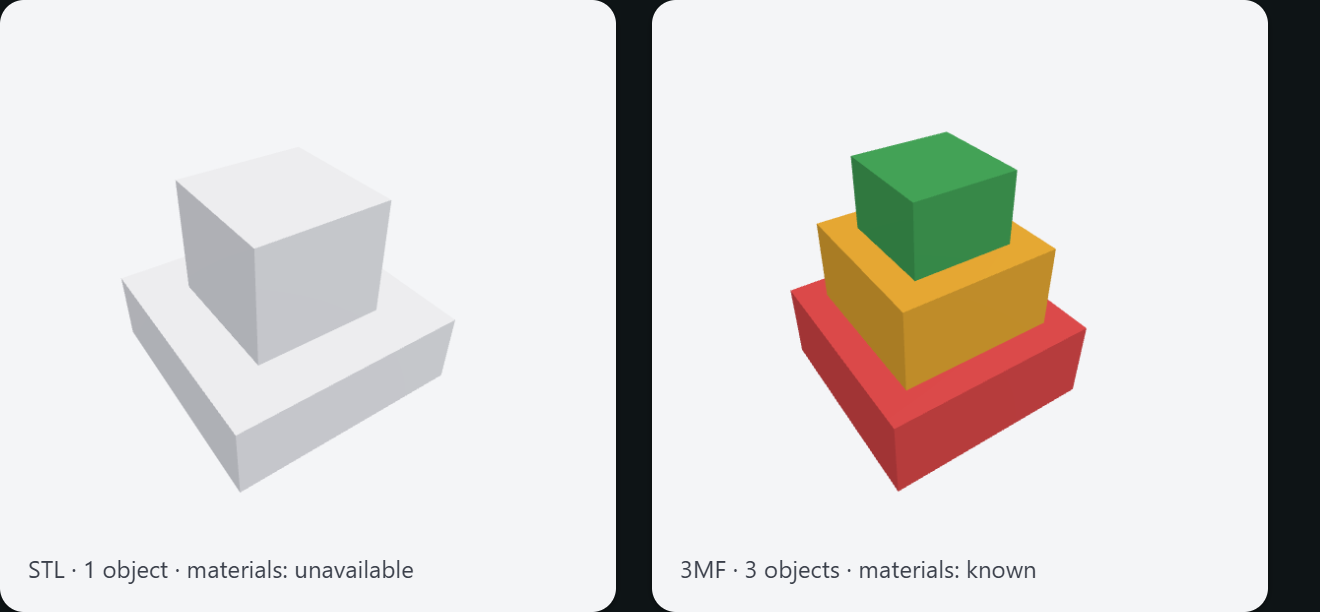
Use it for file-browser thumbnails, library cards, and "what's in this file" previews — the picture a
slicer shows of a part, not the toolpath. For inspecting the actual moves (layers, travel, seams,
color modes, live progress), use @chestnutlabs/gcode-renderer-three
instead.
- STL and 3MF — a bare STL is a single object with no declared material; a 3MF brings its own
multi-object structure, per-object transforms, and per-object / per-triangle material colors,
including files that use the 3MF Production Extension (
p:pathexternal parts). - Production multicolor — real Bambu Studio / OrcaSlicer files paint per-region color with a
proprietary
paint_colorfacet attribute and keep the palette inproject_settings.config, not in standard 3MF materials. The renderer decodes that facet-paint format (clean-room, see RR-005) and reads thefilament_colourpalette itself, so a designer's multicolor model renders in its true colors without slicing. - Capability-honest color — when the source declares colors — standard 3MF
basematerials, orpaint_color+ a filament palette — the render uses them and reportsmaterials: 'known'('approximated'when a handful of multi-color facets are flattened). When it declares none — a plain STL, or a paint format with no palette present — it draws a neutral default and reportsmaterials: 'unavailable'. It never invents a source color. - Fixed presentation pose — framed at a 3/4 angle on the shared render "stage" from
@chestnutlabs/gcode-renderer-three, under a neutral studio light rig, on a transparent (default) or solid background you can composite onto a card. - Headless still —
renderModelStillmirrors the toolpath side'srenderStill: hand it bytes, get back a canvas plus a stablecacheKeyand thematerialsconfidence for that render. Runs in any Chromium-class WebGL2 context (anOffscreenCanvasin a Worker, or headless Chromium). - Interactive viewer —
createModelVieweris the live analogue of the still: orbit, zoom, and pan the same STL / 3MF (including production multicolor) in a browser<canvas>, with camera presets, a serializable camera state, and an event stream for readiness and errors. - Three-free public types —
ModelScene/ModelObject/MeshGeometryare plain typed arrays, so the package's surface never leaksthree; the renderer builds three meshes internally.
import { renderModelStill } from '@chestnutlabs/gcode-model-renderer';
// In a Worker with an OffscreenCanvas, or headless Chromium:
const { canvas, objectCount, materials, cacheKey } = await renderModelStill(
{ kind: '3mf', bytes }, // or { kind: 'stl', bytes }
{ canvas: new OffscreenCanvas(512, 512), background: 'transparent' }
);
// materials === 'known' → the render used colors the file declared
// materials === 'unavailable' → the file carried none; a neutral default was used (never faked)
const blob = await canvas.convertToBlob();
Already hold a corrected or richer filament palette (e.g. re-rendering a sliced file)? Pass
filamentPalette (hex per 0-based slot) to renderModelStill / parse3mf to override the one read
from project_settings.config. Optional — the renderer reads the file's own palette without it.
Interactive viewer
For a live surface a user can orbit — a "View in 3D" for a source model, as opposed to a static
thumbnail — createModelViewer drives the same scene under the shared camera and orbit controls the
toolpath renderer uses:
import { createModelViewer } from '@chestnutlabs/gcode-model-renderer';
const viewer = createModelViewer(canvas); // a real <canvas> in the page
viewer.onEvent((e) => {
if (e.type === 'ready') {
// e.info.materials === 'known' | 'approximated' → showing the file's true colors
// e.info.materials === 'unavailable' → neutral render; don't claim "true colors"
console.log(e.info.objectCount, e.info.materials, e.info.bounds);
}
if (e.type === 'renderer-unsupported') {
// No WebGL — fall back to a renderModelStill image or a static thumbnail
}
});
await viewer.setSource({ kind: '3mf', bytes }); // or { kind: 'stl', bytes }; parse → build → frame
viewer.setView('front'); // 'iso' | 'top' | 'front' | 'back' | 'left' | 'right' | 'bottom'
// ...on unmount:
viewer.dispose();
Drag to orbit, scroll to zoom, right-drag to pan. getCameraState() / setCameraState() persist and
restore a pose (the same serializable CameraState as the toolpath renderer), resize(w, h) matches a
ResizeObserver, and setInteractionQuality('auto') trades detail for smoothness while orbiting. New
source formats become viewable by registering a ModelLoader for a new kind, with no change to the
viewer's API (design: DD-021).
Prefer to build your own scene? parseStl / parse3mf return a three-free ModelScene, and both the
still and the viewer accept a pre-built ModelScene directly.
Framework-neutral Prepare controller
createModelPreviewController wraps createModelViewer in the controller shape the framework adapters
consume — it is the Prepare-side analogue of the toolpath core controller. On top of the raw viewer it
adds a canvas-bindCanvas lifecycle (rebind survives a remount; the last source and any queued control
ops replay on bind), a single reactive state snapshot (getState() / onStateChange()), and an op
queue so calls made before the canvas exists are not lost. It backs the /model subpath of the Vue,
React, Svelte, and Web Component packages; use it directly to build your own adapter.
import { createModelPreviewController } from '@chestnutlabs/gcode-model-renderer';
const controller = createModelPreviewController();
const off = controller.onStateChange((s) => {
// s: ModelPreviewState — loading, ready, rendererSupported, objectCount, materials,
// instancedCount, decimationApplied, bounds, plates, hasPlates, cameraState, progress, error
});
controller.bindCanvas(canvas); // a real <canvas> in the page
await controller.controls.setSource({ kind: '3mf', bytes });
// ...on teardown:
off();
controller.dispose();
The two contract types are ModelPreviewControls (setSource / setView / getCameraState /
setCameraState / setBackground / setInteractionQuality / setRenderScope / frame / resize /
capture) and the ModelPreviewState snapshot above; materials in that snapshot is the same honest
tier the still and viewer report ('known' / 'approximated' / 'unavailable', never invented).
A portable behavioral suite ships at the /testing subpath: runModelBehavioralSuite(name, api, harness) runs one shared set of assertions against any adapter, so every framework's <ModelViewer>
is verified against the same contract as the core controller.
import { runModelBehavioralSuite } from '@chestnutlabs/gcode-model-renderer/testing';
See docs/manual/adapters.md "Two viewers: Preview and Prepare" for
the cross-adapter tour of the four framework wrappers.
Determinism (stills): same input + same environment ⇒ identical output. Cross-GPU/driver pixel identity
is not promised — cache by the returned cacheKey.
Part of Chestnut Labs G-code Preview · MIT
Classes
Interfaces
- MeshGeometry
- ModelBounds
- ModelLimits
- ModelLoader
- ModelLoadOptions
- ModelMaterial
- ModelObject
- ModelPlateSummary
- ModelPreviewController
- ModelPreviewControllerOptions
- ModelPreviewControls
- ModelPreviewState
- ModelReadyInfo
- ModelRendererOptions
- ModelScene
- ModelViewer
- ModelViewerOptions
- Parse3mfOptions
- RenderModelStillOptions
- RenderModelStillResult
- ResolvedLimits